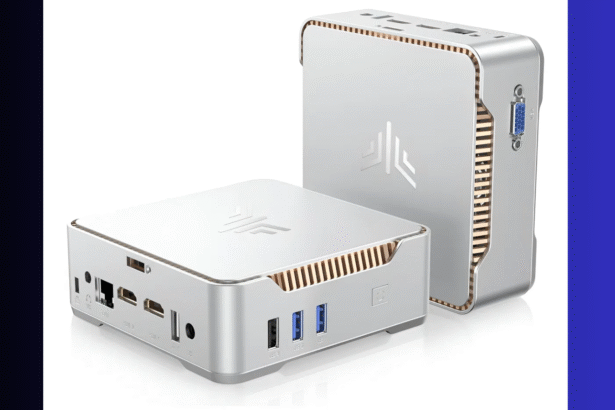
? Is the Minisforum UM890 Pro the Smartest Dev Machine Under $700?

Minisforum UM890 Pro Review: A Developer’s Dream Mini PC
? Introduction: Why This Mini PC Stands Out
In a world where powerful developer hardware often means bulky laptops or expensive desktops, the Minisforum UM890 Pro offers a unique middle ground. Compact, efficient, and equipped with a blazing-fast AMD Ryzen 9 8945HS processor, this mini PC is tailored for professionals who want workstation-class performance in a small footprint. Priced around $650 USD, this unit rivals much larger systems in raw performance while staying whisper quiet.
Whether you’re a backend engineer, a full-stack dev, or someone running complex simulations and Docker containers, this little box is worth a serious look.
? The Heart of It: AMD Ryzen 9 8945HS — A Processor That Pulls Its Weight
At the center of the Minisforum UM890 Pro sits a processor that turns heads in both laptops and compact desktops — the AMD Ryzen 9 8945HS.
This is not a stripped-down, efficiency-core-heavy chip like you’d find in ultrabooks. It’s a full-fledged 8-core, 16-thread CPU built on AMD’s modern Zen 4 architecture, clocked up to 5.2GHz, and fabricated on TSMC’s efficient 6nm process. This chip was designed to strike the perfect balance between performance and thermals, making it a natural fit for power-hungry developers in small spaces.
? Technical Overview
- Architecture: AMD Zen 4 (Phoenix family)
- Cores / Threads: 8 / 16
- Base Clock: 4.0 GHz
- Boost Clock: Up to 5.2 GHz
- L3 Cache: 16MB
- TDP: 45W (configurable)
- Integrated GPU: Radeon 780M (RDNA 3)
For developers, this isn’t just theoretical muscle. It means:
- ? Near-instant compile times in large codebases (Rust, C++, Go)
- ? No stutters or heat-induced throttling while running containers
- ? Smooth multitasking with databases, backend servers, browser tabs, and IDEs all open
- ? Strong performance for virtualization or WSL2 on Windows
- ? Consistent, cool operation even during hours-long workloads
? AMD: The Comeback King of the Chip Industry
Founded in 1969, Advanced Micro Devices (AMD) spent much of its early history playing catch-up with Intel. But since the introduction of the Zen architecture in 2017, AMD has staged one of the most dramatic turnarounds in tech history.
Where AMD once lagged behind in single-core performance, it now leads in multi-threaded workloads, and often wins in power efficiency too. With the Zen 3 and Zen 4 generations, AMD has become the go-to choice not just for gamers and creators, but also for developers who need serious parallel performance.
The Ryzen 9 8945HS is part of AMD’s 2024–2025 push into ultra-efficient, high-core-count laptop and mini-PC CPUs — and it perfectly embodies AMD’s strategy:
More cores, more speed, less heat, better value.
? Comparison: How Does It Stack Up?
? vs Intel Core i7-13700H / i9-13900H
These are Intel’s direct competitors, commonly found in laptops at similar or higher price points.
| Feature | AMD Ryzen 9 8945HS | Intel Core i9-13900H |
|---|---|---|
| Cores | 8 P-Cores / 16 Threads | 6 P + 8 E / 20 Threads |
| Clock | Up to 5.2 GHz | Up to 5.4 GHz |
| TDP | 45W (more efficient) | 45–55W |
| iGPU | Radeon 780M (RDNA 3) | Intel Iris Xe (weaker) |
Verdict: AMD wins in real sustained developer workflows, especially in compact systems like the UM890 Pro where thermal headroom is limited. Intel chips are fast but often bursty and more power-hungry.
? vs Apple M3 (MacBook Pro Base Model)
Apple Silicon is a different beast, but it’s worth comparing since devs often consider MacBooks.
| Feature | Ryzen 9 8945HS | Apple M3 |
|---|---|---|
| Architecture | x86-64 (Zen 4) | ARM-based |
| Max RAM | 64GB (user upgradeable) | 24GB (non-upgradeable) |
| x86 Compatibility | ✅ Native | ⚠️ Rosetta 2 emulation for many tools |
| iGPU | Radeon 780M | Apple GPU |
Verdict: Apple wins on battery life and integrated stack, but the UM890 Pro offers far more flexibility, port compatibility, and toolchain compatibility for developers working with Docker, Linux, or complex backend workflows.
?️ Build & Design
The UM890 Pro packs serious hardware into a chassis that’s roughly 5 inches square and weighs just 1.5 lbs (0.7 kg). It features:
- 2x HDMI ports (4K@60Hz)
- 2x USB-C (1 with DisplayPort support)
- 4x USB-A (USB 3.2)
- 2x Ethernet (2.5GbE + 1GbE)
- 3.5mm audio jack
Internally, it supports:
- Up to 64GB DDR5 RAM
- Dual M.2 SSD slots
- Wi-Fi 6E and Bluetooth 5.2
For developers needing multi-monitor setups, fast storage, or network-heavy environments (hello self-hosted CI/CD), it’s got the goods.
? How It Compares to Laptops
We often assume laptops are the default for dev work, but the UM890 Pro challenges that notion. Here’s how it stacks up against three popular laptops:
| Model | CPU | RAM | Price (USD) |
|---|---|---|---|
| UM890 Pro | Ryzen 9 8945HS | 32GB (upgradeable) | ~$650 |
| ASUS ROG Zephyrus G14 | Same CPU | 16GB | ~$1,399 |
| MacBook Pro 14″ M3 | Apple M3 | 8–16GB | ~$900 |
| Lenovo Legion Slim 7 | Intel i9-13900H | 16GB | ~$1,499 |
Despite being half the price, the UM890 Pro delivers equal or better CPU performance in a cooler, quieter, and more upgradeable format. Just plug in your keyboard, mouse, and monitor — or use a KVM switch — and you’re set.
? Ideal Use Cases
- Backend developers running databases or containers
- Full-stack engineers building and testing complex apps
- Rust, C++, and Go developers needing fast compile times
- Linux lovers and Windows developers who need WSL2
- Remote workers looking to upgrade from a slow laptop
Multi-Monitor Setup & Connectivity

Thanks to its triple video output support, the MINISFORUM UM890 Pro enables a highly versatile and immersive desktop environment right out of the box. It includes:
-
2× HDMI 2.1 ports – each capable of handling 4K @ 60Hz
-
1× USB4 port (Type-C) – supports DisplayPort Alt Mode, allowing you to connect an additional 4K or even 8K monitor
✅ Total native support: Up to 3 independent monitors — with smooth, high-resolution output.
This makes the UM890 Pro ideal for:
-
? Software development: Keep code, docs, and your live preview/test environment open at the same time
-
? Video editing or design workflows: Timeline, preview, and assets across multiple screens
-
? Stock trading, DevOps dashboards, or simulation environments: Monitor real-time data in parallel
➕ Can You Connect a 4th Monitor?
Yes — although the UM890 Pro natively supports only three displays, you can connect a 4th monitor with one of these reliable workarounds:
? Option 1: USB-to-HDMI Adapter (DisplayLink)
Use a DisplayLink-powered USB adapter to add a fourth screen via one of the USB-A or USB-C ports. This solution is stable and perfect for tasks like dashboards, email, Slack, or documentation — though not ideal for fast-motion video or gaming due to slight latency.
? Option 2: USB-C Dock with MST (Multi-Stream Transport)
A more advanced route is to use a USB4 dock that supports MST, which may allow daisy-chaining two displays from the USB-C port. However, AMD systems often have limited MST support, so success varies based on your dock, GPU firmware, and monitors.
? Best practice: If you’re aiming for a 4-display setup, DisplayLink adapters offer the most reliable performance on the UM890 Pro.
? Peripheral Connectivity
Beyond video outputs, the UM890 Pro offers a robust set of ports for peripherals and expansion:
-
2× USB 3.2 Gen 2 Type-A
-
2× USB 3.2 Gen 1 Type-A
-
1× USB4 (Type-C)
-
1× 3.5mm audio jack
-
1× 2.5Gbps LAN port
You can effortlessly connect:
-
External SSDs and backup drives
-
Keyboards, webcams, and drawing tablets
-
USB-C hubs or docking stations for even more expansion
? Internal Expandability
Despite its compact size, the UM890 Pro is incredibly upgrade-friendly:
-
RAM: Comes with 32GB DDR5 (dual-channel), upgradeable up to 64GB
-
Storage: Includes a fast 1TB PCIe 4.0 SSD, plus:
-
One additional M.2 NVMe slot
-
One 2.5″ SATA bay for SSD or HDD
-
This gives you ample room for:
-
Large codebases and design projects
-
Local VMs, Docker containers, and databases
-
Game dev environments and backup images
? Networking & Wireless
-
2.5G Ethernet for ultra-fast wired LAN
-
Wi-Fi 6E for reliable, low-latency wireless performance
-
Bluetooth 5.2 for smooth connectivity with wireless accessories
⚡ Power Efficiency & Portability
As a Mini PC powered by a 65W AMD Ryzen 9 8945HS, the UM890 Pro delivers desktop-class performance at a fraction of the power consumption. It’s energy-efficient, quiet, and compact enough to:
-
Tuck neatly on a desk
-
Mount behind a monitor (VESA bracket included)
-
Slip into a travel bag for mobile work setups
✅ Final Verdict: A Serious Mini PC for Serious Developers
The Minisforum UM890 Pro isn’t just another mini PC — it’s a developer-grade workstation that fits in your hand. For under $750, you get:
- A desktop-class Ryzen 9 8945HS
- Up to 64GB DDR5 RAM
- Fast SSD support
- Dual Ethernet + USB-C DisplayPort
All in a case small enough to disappear behind your monitor.
If you’re tired of compromising on performance, thermals, or upgradeability in your laptop, the UM890 Pro is a rock-solid investment. Pair it with a good monitor, mechanical keyboard, and you’ll have a setup that punches far above its price.
? Ready to Upgrade?
- Want a fast, quiet, upgradable dev machine? ✅
- Tired of throttled laptops and fixed memory? ✅
- Need something powerful but compact? ✅
Then the Minisforum UM890 Pro is exactly what you’re looking for.